OmniChart
Announcing OmniChart: A Morphing Chart Set
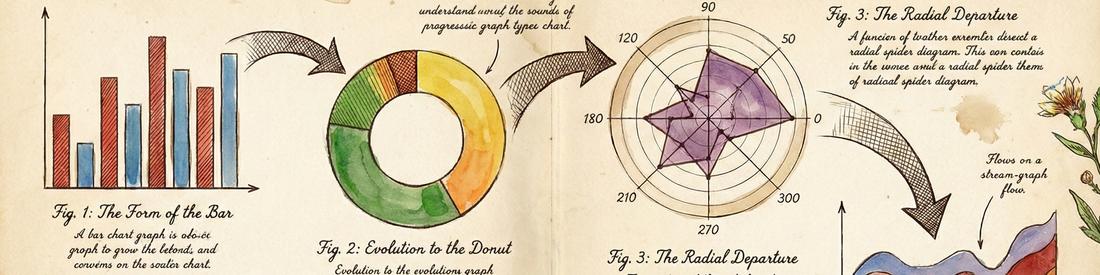
Standard charts that morph into each other
Line, bar and radial graphs are ubiquitous. Let's unify them.
In the controls panel the preset buttons load up standard configurations.
Slide the sliders to control different aspects of the chart.
Why do this? For one thing the morphing is cool. That is a nice side effect, not the underlying reason. The motivation is really an extreme form of DRY, 'Do not Repeat Yourself'. If there is only one piece of code for outlines, shading, captions, colour choice, arranging, then special features of one chart type become available to all chart types.
When writing this with AI assistance I was surprised by Claude actually animating the transitions. I'd intended to jump cut. Claude though has been trained to use css transitions in web design, and Claude Opus 4.5 was smart enough to seize the opportunity to animate the sliders and so animate the diagrams.
Although it looks complicated, I'm aiming for simplicity. Instead of multiple graph types to maintain, I have one. If I add a feature to one graph type it becomes available to them all with one piece of new code.
The uniformity also helps end users. All graph types have the same flexibility and all graph types use it in the same way. That means fewer quirks to learn.
Current Status
OmniChart works as a demo of the morphing concept, and with relatively little work can be customised to specific data sets.
It is not packaged as a drop in replacement for popular graphing javascript. In particular the ability to set and show scales and grid lines is absent. It does not support Scatter plots, Sankey Diagrams or Heatmaps. These would all be minimum requirements for it to become a mainstream workhorse.
Log
- 16-Jan-2026: First preview version
- 19-Jan-2026: Switched to using WarpedPolygon as the foundation and launched
- 23-Jan-2026: Major update to handle mobile now complete
- 01-Feb-2026: Split into components, omnibase.js + omnibase.css, that other morphers can use
- 08-Feb-2026: Added omnigrid → (morphing grids/heatmaps of data)
- 28-Mar-2026: Swirl chart type appeared 'from nowhere'.
- 05-Apr-2026: Major refactoring to use a scene graph.
Made with Claude
Claude made the original skeleton of the code, but with three distinct routines for charting.
- One for the rectangular bar charts
- One for the pie/donut charts
- One for the radial charts
These used a shared class, CurvedQuad, that I had Claude write, but that class used centres of circles and radius to specify the curved edges, which was fragile and which Claude had to think about a great deal on most changes and often got wrong. Because of all this thinking, development was slow and rapidly used up the Claude time.
I made progress again by getting Claude separately in a spike solution to make a demo for a WarpedPolygon. Each side has a 'bend', 0 for straight, PI for a semi circle. The bend is the angle subtended by the curve, and can be positive or negative.
See related work on Morphing Graphs for more background and the WarpedPolygon demo
What Claude did well
Claude implemented the transitions in OmniChart on button pushes, without being specifically asked to, handled boiler plate code for scroll and pan, made good styling and choices of colour.
I asked Claude to keep the code DRY and generally Claude made a much better job of that than when left to its own devices.
When asked to, Claude also did the responsive design for mobile. On mobile the key on the chart which shows what each colour stands for takes up more area proportionally, as the font can only shrink so far. Claude didn't realise that the new 'emoji' key icon to show/hide it was colourful and not in keeping with the design, but fixed it when told so.
The rearrangement of controls and chart panel for mobile use is a little non standard, and Claude did not correctly guess what would be off screen in worst cases. Again, Claude could fix it when told to. The speed up in doing this all with Claude's assistance versus all by hand was considerable.
I had been planning to have a policy of desktop first, and often only desktop, as many designs seem to require the large area. However, the speed with which I can write code that is good on mobile, with AI help, I think I maybe don't need that policy.
LCARS needs the for-mobile change too, and will be harder.
What Claude did badly
Claude was extremely confused by the way three underlying kinds of chart were supposed to link up, and matched up the wrong edges, resulting in the charts tearing as they animated. Getting Claude to fix this in one place would lead to Claude breaking it in another. Claude also couldn't work out which direction to draw curved edges in, and repeatedly got it wrong, resulting in edges bulging rather than flattening. Placing labels on curves, or sub plots on those same curves, would often end up with the items placed in reverse order.
Claude does not like working with circular arcs much. Claude much prefers to work with Bezier curves, and had to be instructed not to use them.
With the basic charts working and sort-of merged, it was much quicker to go into the code myself and make changes. A big advantage I had relative to Claude is that I could see the results of small changes.
Claude can't see the results of the code changes. Directions of arcs, discontinuity of animations and compatibility of orientation are all things Claude struggled with. Claude also is more used to conventional coding using Beziers rather than arcs and separate classes for each kind of graph. Claude has to be repeatedly reminded to use these alternative approaches.