End Shapes

Spike Solution - End Shapes

End shapes are what you have on the ends of arrows, shaped buttons and connecting ribbons. It's a useful idiom.

This spike solution was a request to Claude for tags with Mermaid inspired end shapes:

Symbol End Shape
< Chevron
( Round
[ Flat

I asked Claude to add the shapes on to html spans. You'll find the code at the GitHub safer-centaurs-toolbox.

End shapes are important ubiquitously in Scorpio Diagrams. 'Badges' with text on them have end shapes. The end shapes can be used in specifying the shapes of boxes in flow charts. Ribbons have end shapes, making them into arrows and connections of other kinds. In tiles based on Scratch (the tile-based educational programming languages), the pieces that click together are shaped by 'end shapes', and these shapes follow through naturally to the round and angled pieces used within Scratch shapes. Missing fields can be shown with a sunken bevel, and the shape can indicate what kind of data is required. We can type a value into such a misisng field, or we can drag a piece of the right shape into it.

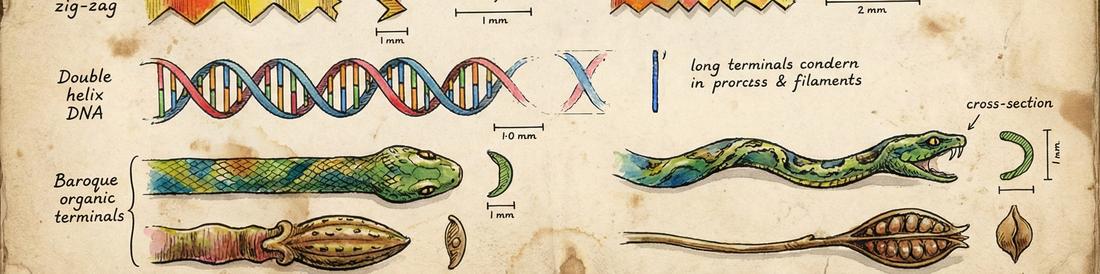
Scorpio extends the idea of the end shape to include named end shapes, such as :zig-zag: and :snake-head:. This leads to using SVG paths for defining the end shapes, to get enough generality.

Spike 1 - Choosing Classes for the End Shapes

Try End Shape Classes →

Claude created the user interface for adjusting the tags, but struggled with the indented round shape - making a bite out of the tag rather than the indent I wanted so as to match the semi circular outdent. I could have fixed that by changing some 50%s to 100%s, but I liked the bite.

I had to prompt Claude to use the background colour in adjusting the tag shapes, as otherwise it used a fixed colour, which limits the reusability of the tags. Claude can't see the output, so it didn't see the problem. Claude confused inwards and outwards in some places too, which was for me to fix up. Easier to fix by hand than to prompt Claude to fix.

// A tag as specced in the first demo
<span class="demo-span left-round right-chevron-out color-blue">Home</span>

Claude added a cute transition when you change settings.

Spike 2 - Tags Drawn as SVG Paths

Try SVG End Shapes →

Claude's first solution used the css 'border trick' for chevrons. That's the trick where you draw wide borders of different colours on different edges. Where the borders meet they do so in a mitred fashion, and the mitre causes the chevron shape. It is a neat trick, but it is terrible for what I want to do. It does not extend to arbitrary shapes. Likewise Claude used a trick for rounded ends. That was to use border-radius - fine for round ends, but no pathway to generalisation. I instructed Claude to use svg paths for the next iteration, to allow more complex paths. At some point I will want the 'zig-zag' end shape.

// A tag with end shapes in the new format
<span class="tag" data="['round','chevron']" style="background-color: #e74c3c;">Inspire</span>

In version 2 I asked for the data="['chevron','round']" syntax that you can see by inspecting the code. I knew creating custom classes for each possible option would get ridiculous. I want, for example, bites of different sizes, and variation of slope of the chevrons - so I want to be able to supply sizing options. Although it is possible to set up classes for many individual end shapes, it is much easier to treat the entire outline as a single svg shape. The data array acts as a nascent domain specific language which you can later extend. For example I would like to add some shaping to the upper and lower edges.

By hand I adjusted the extra or reduced padding for the text when there is an end shape. It's a visual thing which Claude can't do.

Claude added the drop shadow and the interaction on hover. Claude has been trained to make the styling of html pop. The shadow is on the whole span rather than on the svg, so there is tweaking to do to make it more satisfying.

Take Homes

I hadn't thought of using data='[args]' instead of multiple classes until Claude started using something like it. The querySelector below was new to me, and makes processing all tags on a page straightforward.

const tags = document.querySelectorAll('.tag[data]');

Made with Claude

Claude made a lot of boilerplate code for the svg, which got something working fast. I am not sure I 'like' it, but it gets the job done, and I can pare it down later.

Claude is unaware of the issue that end shapes are drawn bottom to top on the left edge and top to bottom on the right edge. When reusing shapes on left and right, we may need reflection or rotation.

Claude added a lot more padding in the tags than I would. Such things can be fixed later.

Claude has difficulty tracking direction in drawing SVG. Working with Claude suggested the data=[] idiom, which I wouldn't have got to on my own.